
Digital Banking
Upgrade Coming 6/24
Access your UCU accounts conveniently and securely from the comfort of your home, or on the go.
Get Started!
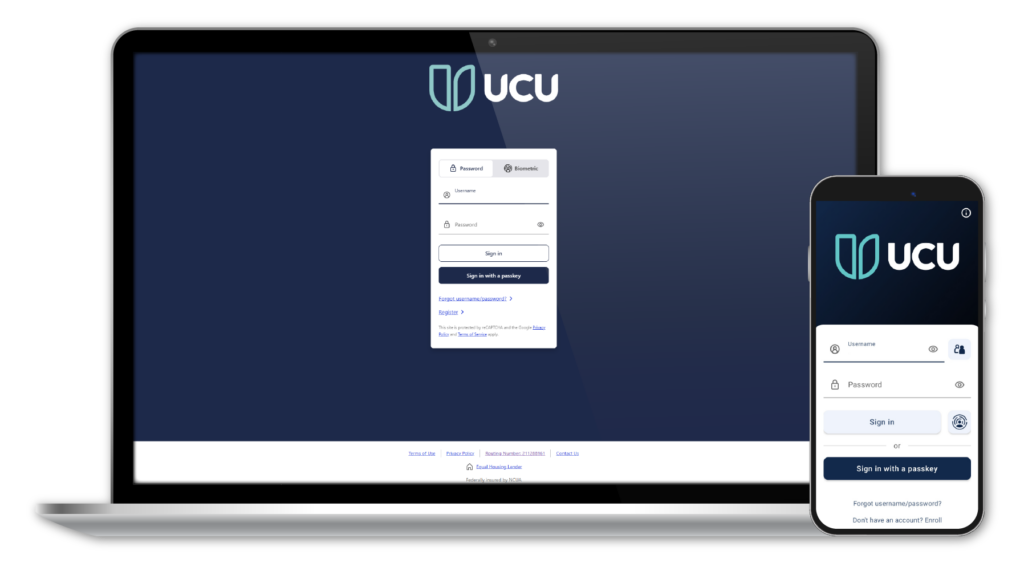
Click the "Sign In" button at the top of the page and enter your username and password.
New to Digital Banking? Click the "Sign In" button and then click "Don't have an account? Enroll".
Mobile App
The convenience of digital banking with added features like mobile check deposit, for life on the go!
Download
Get the UCU Mobile App from the Apple App Store or Google Play Store.


Frequently Asked Questions
Yes. Digital Banking and the mobile app will be unavailable from 10 PM on Tuesday June 23rd through 7 AM Wednesday June 24th. Please note this timing may change, we’ll keep you informed.
Nope! You can continue using your existing username and password - easy as that.
No worries. Just click “Forgot Password” on the Sign In screen, and we’ll send a one-time PIN by email or text to help you reset it securely.
No need! Simply update your existing UCU app from the App Store or Google Play. As long as you update (instead of deleting and reinstalling), your saved username and biometric settings will carry over.
Everything comes with you! Your payees, scheduled payments, and full payment history will transfer automatically.
Yes! We do recommend logging in shortly after go-live to double-check that everything looks just right.
Yes, your linked accounts will come along, too.
Absolutely. You’ll see your full transaction history on the Accounts page, and your eStatements will still be there whenever you need them to view or download.
Yes, alerts do move over with the upgrade. With new enhanced alert options there are new features you can turn on for both security alerts and account alerts. Learn more about new security and account alert options in our FAQ, such as predictive insufficient funds alert, external transfer submitted alert, and more.
You may notice a brief interruption while those services reconnect. This can take a few days to a couple of weeks. You might also need to reconnect or re-authenticate your UCU account within those apps.
A Passkey lets you sign in securely without a password using your device’s built-in security features. We highly recommend turning it on for a faster, more secure experience.
Yes! Make it your own by reordering, showing, or hiding accounts to fit your needs.
New Features!
The Kasasa Rewards Dashboard allows you to easily track your progress towards your Kasasa rewards, and shows you which qualifications you have already met for the current rewards cycle. You can also see rewards earned in each of the past months and rewards earned YTD!
How-to on Mobile
Click Menu in the lower right corner of the app. Go to the Accounts section and click Kasasa. This will open the Kasasa Rewards Dashboard.
How-to on Desktop
Click Accounts in the menu at the top of the page, then click Kasasa. This will open the Kasasa Rewards Dashboard in another tab.
Don't have Kasasa?
You can add a Kasasa Checking Account right within the Rewards Dashboard. Just follow the instructions and select which account sounds best to you. If you have any questions about Kasasa or which account might fit you best, learn more here, or feel free to reach out to us!
Passkeys replace the need for typing in your password every time you wish to sign in. They are easier to use, faster and more secure!
How-to on Mobile
Setting up a Passkey: Click Menu in the lower right corner of the app. Scroll to the Contacts & Settings section and click Profile & Security, then click Passkeys.
Click Add a Passkey and choose which location you want to save your Passkey. Continue to follow the instructions to finish setting up your passkey.
When signing in using a Passkey, click Sign In With A Passkey on the sign in screen and you will be prompted to verify your passkey.
How-to on Desktop
Setting up a Passkey: In the top menu, click Tools & Services > Profile & Security > Passkeys.
Click Add a Passkey and choose which location you want to save your Passkey. Continue to follow the instructions to finish setting up your passkey.
When signing in using a Passkey, click Sign In With A Passkey on the sign in screen and you will be prompted to verify your passkey.
Customize your view by changing the theme between Light and Dark modes.
How-to on Mobile
Click the Menu icon in the lower right corner of the app.
Scroll to the Contacts & Settings section and click App Settings. Click Appearance, then select either Light or Dark theme. The device theme is set to Light theme by default.
How-to on Desktop
At the top right of the page, click the Moon icon. This will toggle between light and dark viewing modes.
View improved charts and insights within Digital Banking, including categorized transactions (subscriptions, recurring, income, etc.) and a monthly balance forecast.
Digital Banking How-to Guides
How-to on Mobile
Click the Menu in the lower right corner of the app and scroll down to the Services section.
Click Apply for a Loan or Apply for a Real Estate Loan.
How-to on Desktop
Click Tools & Services, then click either Apply for a Loan or Apply for a Real Estate Loan. Follow the instructions for the type of loan you'd like.
How-to on Mobile App
You can use Biometric Authorization with your mobile device, either fingerprint or Face ID, to log into Digital Banking from the Mobile App and on desktop.
Sign into your account on the Mobile App and click on the Menu in the lower right corner. Then click App Settings.
Use the toggle switch next to Face ID authentication or Biometric authentication to turn on biometrics. You can also choose if biometrics are automatically prompted when you open the Mobile App.
Once biometrics are enabled, the next time you sign in on your mobile device, you will be prompted to use biometrics to sign in, either with Face ID or fingerprint (depending on your device's biometric capabilities.) If biometrics are not automatically prompted, click on the round fingerprint button next to the Sign in button.
How-to on Mobile
Click on the Menu in the lower right corner of the app.
Scroll to the Messages & Alerts section and click on Manage Alerts.
Security Alerts: Use the toggle switches to turn each alert on or off.
Account Alerts: There are different types of Account alerts to choose from. Click on the one you would like to activate, such as "Balance Alert", and then click to Add the alert. You will then be asked to set up the parameters for the alert, and select which account you want the alert to be active for.
Delivery Preferences: Use the Delivery Preferences to choose what sort of notifications you would like to receive for the alert: Email, Text, or Push notification.
How-to on Desktop
Click on Tools & Services then Manage Alerts.
There are two categories of Alerts: Security Alerts and Account Alerts.
Security Alerts: Use the toggle switches to turn each alert on or off.
Account Alerts: There are different types of Account alerts to choose from. Click on the one you would like to activate, such as "Balance Alert", and then click to Add the alert. You will then be asked to set up the parameters for the alert, and select which account you want the alert to be active for.
Delivery Preferences: Use the Delivery Preferences to choose what sort of notifications you would like to receive for the alert: Email, Text, or Push notification.
How-to on Mobile
Click on the Menu in the lower right corner of the app.
Scroll down to the Cards section and click Debit Card Controls.
Locking Card: Select the correct card from the list of cards, then click Lock Card to deactivate your card instantly. If you find your card, you can unlock it in the same way.
Reporting Card Lost: Select the correct card from the list of cards, then click Report Lost Without Reordering. This will permanently deactivate the card and remove it from your card list. To order a replacement card, call us at 800.696.8628.
Setting Travel Notification: Schedule travel notifications to alert us when you plan on using your cards out of state or abroad. Click Set Travel Notification. Enter the time period you will be traveling, then select the USA destinations and/or International destinations you are traveling to. Use the toggle switches next to your cards to select which cards you will be using for the trip.
How-to on Desktop
If you misplace your debit card, you can take quick action to lock it right from Digital Banking.
Click Accounts, look under Cards, then click Debit Card Controls.
Locking Card: Select the correct card from the Cards list on the left, then click Lock Card to deactivate your card instantly. If you find your card, you can unlock it in the same way.
Reporting Card Lost: Select the correct card from the Cards list on the left, then click Report Lost Without Reordering. This will permanently deactivate the card and remove it from your card list. To order a replacement card, call us at 800.696.8628.
Setting Travel Notification: Schedule travel notifications to alert us when you plan on using your cards out of state or abroad. Click Set Travel Notification. Enter the time period you will be traveling, then select the USA destinations and/or International destinations you are traveling to. Use the toggle switches next to your cards to select which cards you will be using for the trip.
How-to on Mobile
Click Menu in the lower right corner of the app.
Under the Accounts section, click eStatements.
Enrolling in eStatements: Click the slider icon in the upper right, and use the toggle switch to enable eStatements.
Viewing & Downloading eStatements: Use the drop down to select the account you would like to see eStatements for. Your eStatements will be listed and you can view them instantly by clicking the Eye icon, or you can download as a PDF by clicking the Download icon.
How-to on Desktop
Click Accounts on the top menu, then click eStatements.
Enrolling in eStatements: Click Preference on the upper right, and use the toggle switch to enable eStatements.
Viewing & Downloading eStatements: Use the drop down to select the account you would like to see eStatements for. Your eStatements will be listed and you can view them instantly by clicking the Eye icon, or you can download as a PDF by clicking the Download icon.
How-to on Mobile
Click Transfer on the lower bar at the bottom of the app.
Under Other Options, click "To another member"
Sending Money: To send money to another member, use the FROM field to select which one of your accounts you would like to send money from. In the TO PAYEE field, select the Payee you want to send money to. If you do not have any Payees saved, click to Add Payee. Set up a new internal Payee by following the instructions using either their account number and last name, or use a PayKey. To set up a PayKey, see the PayKey instructions below.
Once your FROM account and Payee are selected, you can enter how much you want to send, when to send it, and you can add a memo for the transfer if you'd like. You can also set up a recurring transfer in the "When to send the money?" field.
Receiving Money & Using PayKeys: Click the Get Paid button to set up a PayKey for the account you want to receive money to. A unique code will be generated that you can share with the other UCU member. This allows you to receive money from the other member without sharing your account number!
How-to on Desktop
Transfer funds between your account and another UCU member's account securely and conveniently.
Click Transfers & Payments from the top menu, then click Make a Transfer.
Under Other Options, click "To another member"
Sending Money: To send money to another member, use the FROM field to select which one of your accounts you would like to send money from. In the TO PAYEE field, select the Payee you want to send money to. If you do not have any Payees saved, click to Add Payee. Set up a new internal Payee by following the instructions using either their account number and last name, or use a PayKey. To set up a PayKey, see the PayKey instructions below.
Once your FROM account and Payee are selected, you can enter how much you want to send, when to send it, and you can add a memo for the transfer if you'd like. You can also set up a recurring transfer in the "When to send the money?" field.
Receiving Money & Using PayKeys: Click the Get Paid button to set up a PayKey for the account you want to receive money to. A unique code will be generated that you can share with the other UCU member. This allows you to receive money from the other member without sharing your account number!
How-to on Mobile
Depositing a check using Mobile Check Deposit: Click Deposit on the lower bar at the bottom of the app. Read the endorsement requirements and click Got it.
Position your check on a flat surface with a clean background, such as a table or desk.
Click the Take photos button. The app will ask you if you would allow access to your device's camera. Click Allow to continue.
Follow the instructions on the screen and turn your device sideways to align the camera frame with the check. The app will automatically take a photo when the check is within the frame and in focus. If this doesn't work, you will be asked to re-take the photo and you can choose to do so manually - just follow the instructions on the screen.
Use the To field to select which account you'd like to deposit the check. Enter the amount of the check in the Amount field. You can add a memo if you'd like.
Click the Continue button.
This feature is only available on the Mobile App
How-to on Mobile
Enabling a One-time PIN (OTP) for every login: Click Menu in the lower right corner of the app. Scroll down to the Contacts & Settings section and click Profile & Security > Request an OTP on every login.
Use the toggle switch to turn on. Click save.
How-to on Desktop
Enabling a One-time PIN (OTP) for every login: In the top menu, click Tools & Services > Profile & Security > Request an OTP on every login.
Use the toggle switch to turn on. Click save.
How-to on Mobile
Click Menu in the lower right corner of the app, go to the Accounts section, and then click Open New Share.
Scroll side to side to choose between Club or Certificate, then choose which type of Club Account or Share Certificate you'd like to open.
Learn more about Club Accounts & Share Certificates
How-to on Desktop
Click Accounts, then Open New Share.
Choose either Club or Certificate, then choose which type of Club Account or Share Certificate you'd like to open.
How-to on Mobile
Moving and Organizing Accounts: Each account is displayed as a box or a "tile", and in the lower right corner of each account tile there are two small lines. These lines indicate the account can be moved.
Click and hold on the center of the account you wish to move and drag the account to the position you prefer.
Manage Account Groupings: To create account groups, click the slider icon on the top right corner of the app, then click "Manage account grouping". There you can add new groups. Once a new group is made, it will be listed in your Accounts pane.
You can then drag accounts into your preferred groups by using the same click and drag steps above.
Show/Hide Accounts on Account Summary: You can decide which accounts to show or hide in the Display Options. Click the slider icon on the top right corner of the app, then click Display Options. Use the Eye icon to toggle the accounts to either show or hide.
How-to on Desktop
Main Account Summary Page: The Account Summary page is displayed on the main screen, showing all recent transactions for the selected accounts(s) for easy viewing.
To the left, you will see your individual accounts listed in the Accounts pane.
Moving and Organizing Accounts: Each account is displayed as a box or a "tile", and in the lower right corner of each account tile there are two small lines. These lines indicate the account can be moved.
Click and hold on the two small lines and drag the account to the position you prefer.
Manage Account Groupings: To create account groups, click "Manage account grouping" at the top of the Accounts pane. There you can add new groups. Once a new group is made, it will be listed in your Accounts pane.
You can then drag accounts into your preferred groups by using the same click and drag steps above.
Show/Hide Accounts on Account Summary: You can decide which accounts to show or hide in the Display Options. Click Tools & Services>Contacts & Settings>Display Options. Use the Eye icon to toggle the accounts to either show or hide.
How-to on Mobile
As a UCU member, you have a suite of powerful financial checkup tools at your fingertips, right within Digital Banking! SavvyMoney gives you daily access to your credit score, full credit report, credit monitoring, financial tips, education topics, and more.
Accessing SavvyMoney: Click Menu at the lower right corner of the app. Scroll to the Services section and click Credit Score/Loan Rates.
Verify your information and check the box to accept the terms and conditions of SavvyMoney and continue.
How-to on Desktop
As a UCU member, you have a suite of powerful financial checkup tools at your fingertips, right within Digital Banking! SavvyMoney gives you daily access to your credit score, full credit report, credit monitoring, financial tips, education topics, and more.
Accessing SavvyMoney: In the top menu, click Tools & Services, then Credit Score/Loan Rates. Check the box to accept the terms and conditions of SavvyMoney and continue.
Online Privacy Policy
The UCU Online Privacy Policy can be found on our website by visiting this page.